Two-Factor Authentication (2FA)
Two-Factor Authentication (2FA) is an essential security feature that helps protect your account from unauthorized access. It requires two verification steps:
Even if someone obtains your password, they won’t be able to access your account without the second verification step.
How We Use 2FA
To keep your account secure, Two-Factor Authentication (2FA) using an authenticator app is required on every account. You will be asked to set it up the first time you sign in, and it cannot be skipped.
We deliberately do not offer email or SMS codes as a second factor. Both travel over channels that can be intercepted or taken over — an email account can be phished, and a phone number can be moved to another SIM. An authenticator app generates codes on your device, so there is nothing in transit to intercept.
Frequently Asked Questions
Why do I need two-factor authentication?
2FA strengthens account security by requiring both your password and a unique code generated by your authenticator app. This dual-layer approach makes it far harder for unauthorized users to gain access.
How does 2FA protect your account?
2FA works by combining two types of verification—typically your password and a time-sensitive code. Even if someone steals your password, they cannot access your account without the second factor. This dramatically reduces the risk of unauthorized access and helps secure your sensitive data.
Why is 2FA important?
2FA significantly lowers the chance of someone breaking into your account—even if your password is exposed. It adds a critical security layer around your personal and financial data.
What makes 2FA different from other security measures?
2FA is more secure than passwords alone because it requires a second, independent verification step. This two-layered approach makes unauthorized access much harder, even if your password is compromised.
How reliable is 2FA?
2FA is widely recognized as a highly effective security measure. While no system is entirely immune to attack, using 2FA greatly reduces your exposure to common threats like phishing, credential stuffing, and brute-force attacks.
What 2FA methods are supported?
- Authenticator apps (such as Google Authenticator, Microsoft Authenticator, Duo Mobile or Authy)
This is the only supported method. We do not use email or SMS codes as a second factor.
What about using authenticator apps? Are they more secure than mobile or email notifications?
Yes. Authenticator apps generate verification codes on your device and are not transmitted over a network, making them more resistant to SIM swapping and interception. They’re generally more secure than SMS or email-based 2FA.
If my account is hacked, could hackers share my 2FA information like they do with passwords?
Not easily. 2FA codes are short-lived and unique to your device, making them difficult to reuse or share like passwords. Each code is valid for about 30 seconds before your app replaces it with a new one.
Can hackers steal my 2FA codes without hacking my account?
While rare, phishing and social engineering can trick users into revealing 2FA codes. Always make sure you're entering your 2FA code into a trusted source and never share it with anyone—even if they claim to be support staff.
When should I use 2FA?
Enable 2FA on all accounts that store sensitive or personal information—especially those related to email, finances, or identity. The more important the data, the more crucial it is to protect with 2FA.
Is biometric authentication considered 2FA?
Biometrics can be used as one of the factors in a 2FA process but, by itself, is not 2FA. True 2FA requires two distinct forms of verification—biometric plus password, for example.
What is my recovery code, and how do I use it?
When you finish setting up 2FA we show you a recovery code once — 16 characters in the format XXXX-XXXX-XXXX-XXXX. It signs you in if you lose your authenticator app, and it is the fastest route back into your account because it needs no help from us.
Save it before you continue. We ask you to tick "I have saved my recovery code" before the setup screen will let you carry on, because we cannot show the code again afterwards.
Keep it somewhere other than your phone. A password manager, or printed and stored safely. If it only exists on the device running your authenticator app, losing that device loses both at once.
To use it, sign in with your email and password as usual, then choose Lost your authenticator? Use a recovery code on the screen that asks for your 2FA code.
It works once. After using it, set 2FA up again on your new device and generate a replacement.
Never share it. It is as powerful as your authenticator app, and our support team will never ask you for it.
How do I get a new recovery code?
Go to Settings & Privacy → Password & Security. The Recovery Code section shows whether you still have an unused code, and Generate New Code issues a fresh one.
You will be asked for a code from your authenticator app first — a recovery code cannot be used to create its replacement. Generating a new code cancels the previous one straight away, so save the new one and discard the old.
What happens if I lose access to my 2FA device?
Use your recovery code. Sign in with your email and password, then choose Lost your authenticator? Use a recovery code. Set 2FA up again on your new device straight away, then generate a replacement code from Settings & Privacy → Password & Security.
If you no longer have your recovery code, contact our support team at support@chintai.io to begin the account recovery process.
You will be asked to confirm your identity on a call with our customer service team, against the identity documents we already hold for you. We cannot restore access by email alone.
Once your identity is confirmed, we will help you register your authenticator app again during that same call, so your account is not left without a second factor.
What happens if I lose access to my email, phone, or authenticator app?
If you still have the recovery code from when you set up 2FA, use that — see the previous question.
If you have lost that too, contact our support team at support@chintai.io to begin the account recovery process. You will be asked to confirm your identity on a call, against the identity documents we already hold for you, and we will help you register your authenticator app again during that call.
Is 2FA required to use the platform?
2FA is mandatory to access your account and perform sensitive actions such as logging in, updating account details, or initiating withdrawals.
Can I use SMS for 2FA?
No, SMS is not supported. An authenticator app is the only supported method. SMS is considered insecure due to the risk of SIM swapping and interception.
Why isn't SMS recommended for 2FA?
SMS-based 2FA can be compromised through SIM swapping—where an attacker tricks your mobile carrier into transferring your number to a new SIM card. This allows them to intercept your 2FA codes and access your accounts. Authenticator apps offer much stronger protection.
Will 2FA affect my ability to use platform features like trading or staking?
No. 2FA only activates during login and certain high-risk actions. It will not interfere with your normal use of trading, staking, or other platform features.
How can I reset my 2FA?
If you are able to log in to the application. You can reset your 2FA through the Settings & Privacy page. Here is a step-by-step guide on the reset:
Step 1 - Navigate to the Settings & Privacy page through the bottom left dropdown menu.
Step 2 - Navigate to the Password & Security Tab from the left nav and click on “Reset Authentication” Button. A modal to enter your current Authentication code will appear.
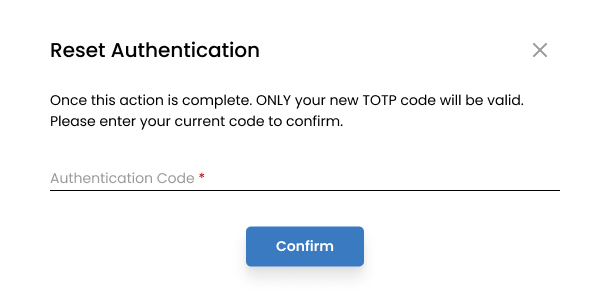
- Step 3 - Follow the process to reset your 2FA, Log out, and log in with the new code registered.
If you cannot sign in because you no longer have your authenticator app:
Use your recovery code to sign in, then reset 2FA from the Settings & Privacy page as described above. This is the quickest route and needs no help from us.
If you do not have your recovery code, submit a reset request to our support team at support@chintai.io to begin the reset process.
You will be asked to confirm your identity on a call with our customer service team, against the identity documents we already hold for you.
Once your identity is confirmed, we will help you register your authenticator app again during that same call.